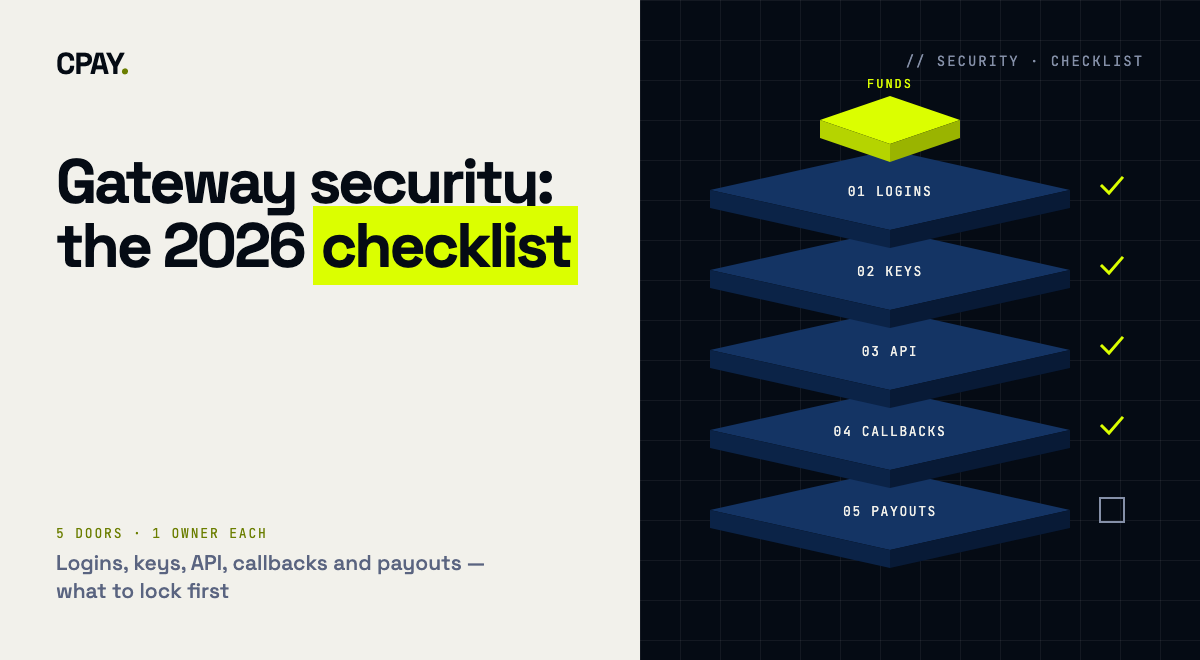
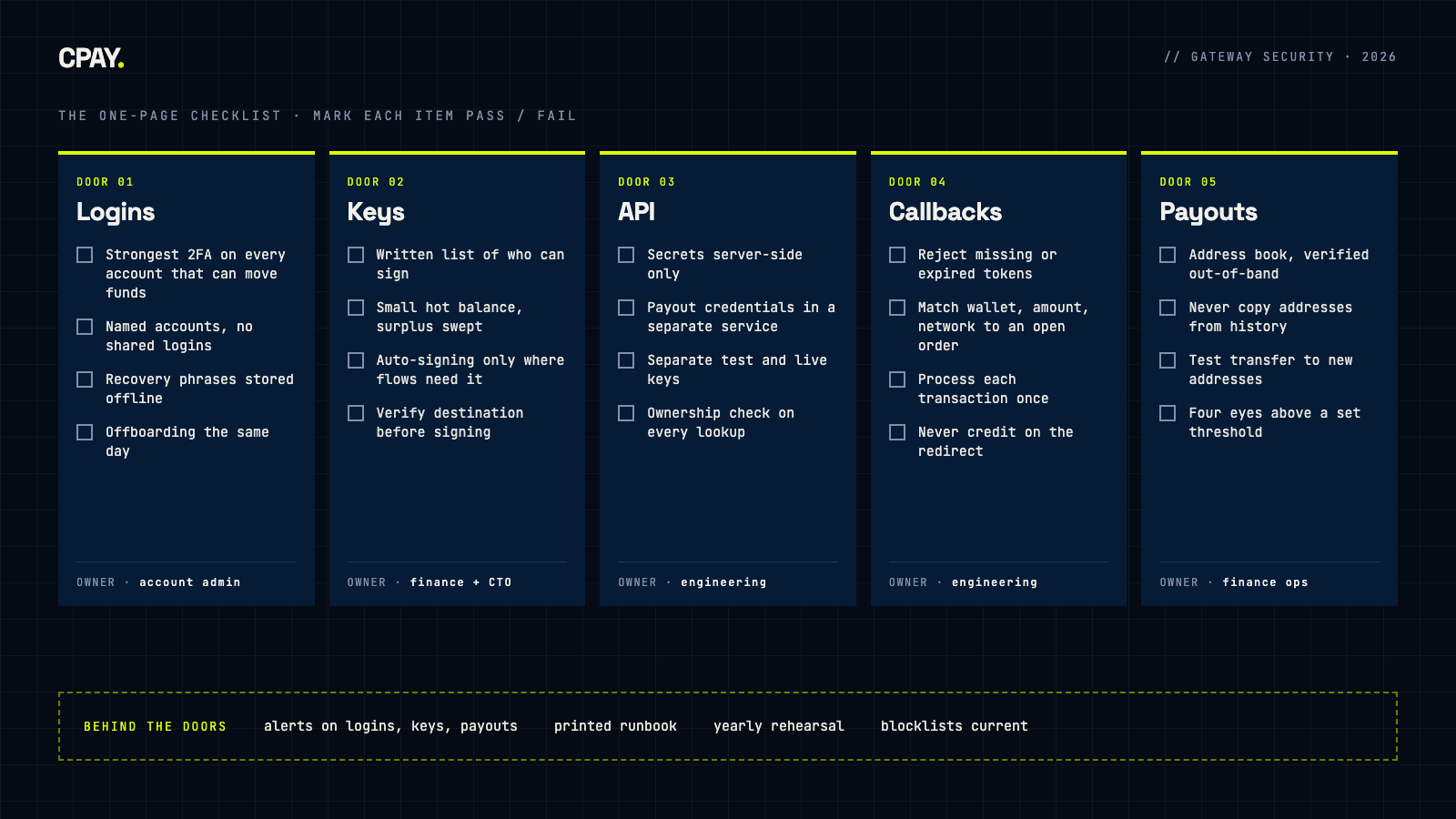
Most crypto payment losses don't start with broken cryptography. They start at a door someone left open: a dashboard login without strong 2FA, an API key in a frontend bundle, a callback endpoint that credits orders it never verified, a payout to an address copied from transaction history. This checklist walks through the five doors into a business's crypto money (logins, keys, API, callbacks and payouts) plus the monitoring that tells you when someone is trying one. Each check is short, testable and owned by a specific person.
Before you start: How to use this checklist
Run it as a 60-minute review with whoever owns payments engineering, finance operations and account administration. Mark every item pass, fail or don't know. Treat "don't know" as a fail until someone proves otherwise; in security reviews it usually is one.
The stakes are well documented. Chainalysis counted more than $2.17 billion stolen from crypto services in the first half of 2025 alone, already more than in the whole of 2024. Most of that came from a single incident, but the pattern underneath is familiar: attackers go after the people and processes that can move funds, then move quickly.
One incident, about 69% of the half-year total. The February 2025 Bybit theft, roughly $1.5 billion, accounted for about 69% of funds stolen from services in H1 2025. The FBI attributed it to North Korean actors it tracks as TraderTraitor and asked the industry to block addresses used for laundering. The lesson for a merchant: signing and approval flows are a target in their own right.
Door 1 — Logins: Who can sign in to the money
Your payment dashboard can create wallets, export keys and send withdrawals. Treat every login to it like a login to the company bank account.
- Strong 2FA on every account that can move funds. CISA ranks phishing-resistant MFA (FIDO/WebAuthn or PKI) as the strongest form and warns that SMS and voice codes can be intercepted through SIM swaps and SS7 weaknesses. Use the strongest factor your provider supports, and turn on more than one where you can.
- Named accounts only. One person, one login. Shared credentials make every action in the audit log anonymous.
- Recovery material stored offline. Backup phrases and recovery codes live in a safe or a hardware-backed vault, never in a chat thread, a shared drive or a password manager note anyone on the team can open.
- Offboarding within a day. When someone leaves, their access, 2FA devices and any API keys they created are revoked that day. Test this with the last person who left.
Door 2 — Keys & signing: Where the private keys live and who can use them
In crypto, whoever controls the signing key controls the funds. The first question is architectural: does your provider hold the keys (custodial) or do you (non-custodial)? Both can be run safely, but they move the risk to different places. Our custodial vs. non-custodial guide covers the trade-off in detail.
- A written answer to "who can sign?" List every person, server and automation that can produce a valid signature for each wallet. If the list surprises anyone, that's your first fix.
- Hot balance kept small. The wallets that sign automatically hold what you need for the next payout cycle. Surplus is swept to a wallet that needs a deliberate, human-approved signature.
- Automatic signing used deliberately. Auto-signing keeps checkouts and swaps running without a human in the loop. Leave it on where flows depend on it, and turn it off on treasury wallets that don't.
- Seed phrases and key exports treated as break-glass. Exporting a private key or seed should be rare, logged and protected by 2FA. For the options beyond a single seed phrase, see MPC vs. multisig vs. seed phrase.
- Verify what you sign. Approvers check the destination, amount and network on an independent screen before they sign. A signature on a tampered transaction is still a valid signature.
Every control on this list answers one question: who can move money, and how would you know? (A rule of thumb, not a quote.)
Door 3 — API & integration: Keys in code, and what they can do
Your integration holds credentials that can create payment wallets, read balances and, with more access, withdraw. The OWASP API Security Top 10 (2023) is the standard reference for what goes wrong here. Broken object-level authorization and broken authentication sit at the top of the list.
- Secrets live server-side only. API private keys never ship in a web bundle or mobile app, and never land in a repository. Scan your repos and build artifacts for them today.
- Split by power. Creating an invoice needs far less than sending a withdrawal. Keep the credentials that can move funds in a separate service, with separate access, from the code that renders checkout.
- Separate test and live. Testnet and mainnet use different accounts and different keys. A leaked staging key should never be able to touch real funds.
- Customers see only their own payments. Every invoice, wallet and transaction lookup checks ownership on the server. Guessable IDs plus a missing check is OWASP's API1, and it leaks payment data.
- Rotation is a routine. You can rotate every API key in under an hour without downtime, and you've done it at least once.
Door 4 — Callbacks: The webhook that says "paid"
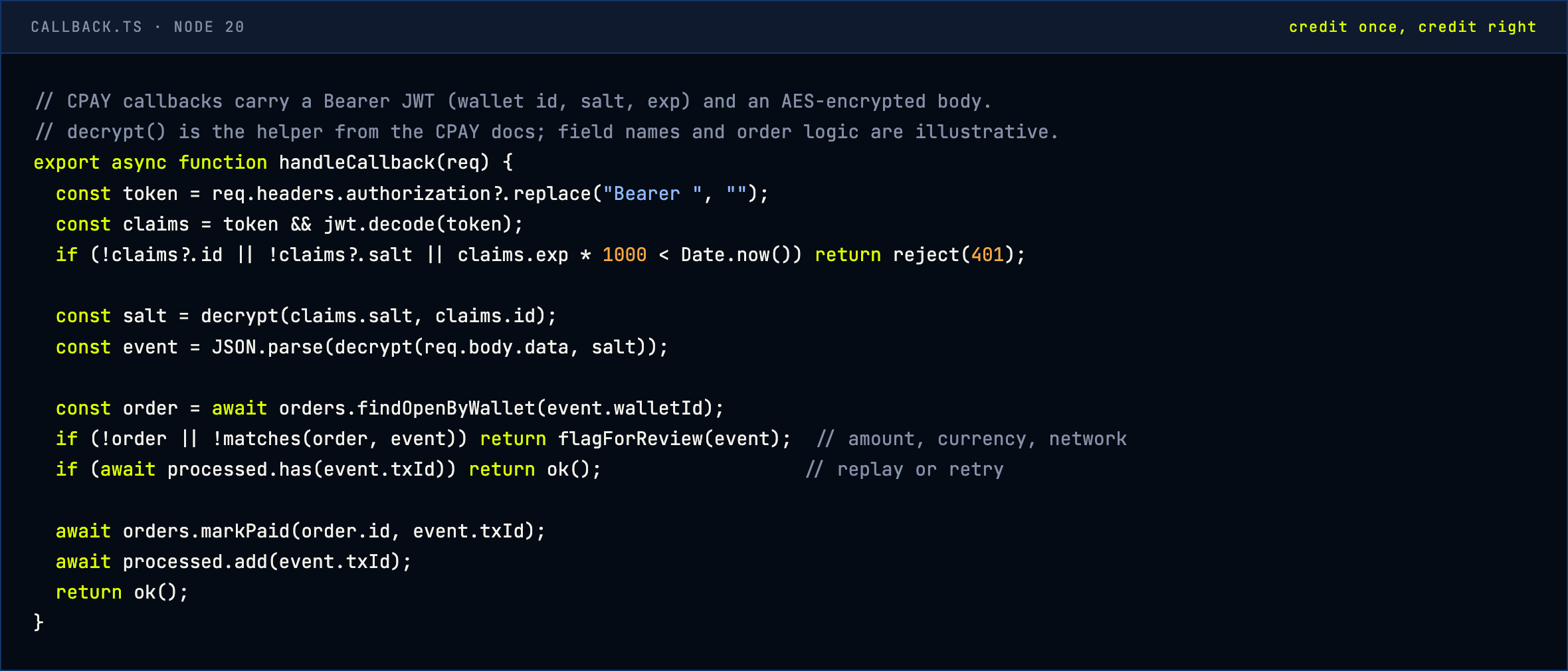
The callback is where a payment becomes an order. It's also the easiest place to fake one. A merchant that credits orders on any POST to its callback URL, or on the customer's redirect back to a "success" page, has handed out a free-goods button.
- Authenticate every callback. Reject requests with a missing or expired token, and parse the payload only after it decrypts or verifies correctly.
- Match it to an order you created. Wallet, currency, network and amount must all match what you expected, and the order must still be open.
- Process each transaction once. Store the transaction ID and ignore repeats. Retries happen, and so do replays.
- Handle the edge cases on purpose. Underpayments, overpayments and late payments get explicit rules; see our guide to failed and underpaid transactions.
Door 5 — Payouts: Where money leaves, and to whom
A withdrawal to the wrong address is final. Most payout losses come from a wrong destination, whether through social engineering, a compromised supplier email or a copied look-alike address.
- Saved, verified destinations. Routine payouts go to addresses in an address book or allowlist, added through a process that confirms them out-of-band (a call to a known number, a signed request).
- Guard against address poisoning. Attackers plant look-alike addresses in your transaction history with tiny transfers. MetaMask's guidance is blunt: never copy a destination from history, and check the full address, middle characters included.
- A test transfer for every new address. Send a small amount, confirm receipt with the recipient, then send the rest.
- Four eyes above a threshold. Set an amount above which a second person approves. Write the threshold down so nobody improvises it under pressure.
- Screen counterparties. Payouts to sanctioned or high-risk addresses are a compliance failure as well as a loss. Our sanctions screening guide explains where screening fits.
"New bank details" now arrive as "new wallet address". The supplier-email scam has moved on-chain. Any request to change a payout address, from a supplier, a partner or the CEO, gets verified through a channel the requester didn't choose.
Behind the doors: Monitoring and response
Prevention fails eventually. What matters then is how fast you notice and how calmly you act.
- Alerts on the events that matter: new logins from new devices, 2FA changes, new API keys, key or seed exports, new payout addresses and withdrawals above your threshold.
- A one-page runbook: who can freeze withdrawals, how to rotate every key, how to switch off automatic signing, and who calls whom. Print it, because a compromised laptop is a bad place to keep it.
- A rehearsal: run the runbook once a year with a fake incident. Time it.
- Blocklists kept current: when law enforcement publishes laundering addresses, as the FBI did after the Bybit theft, make sure your screening picks them up.
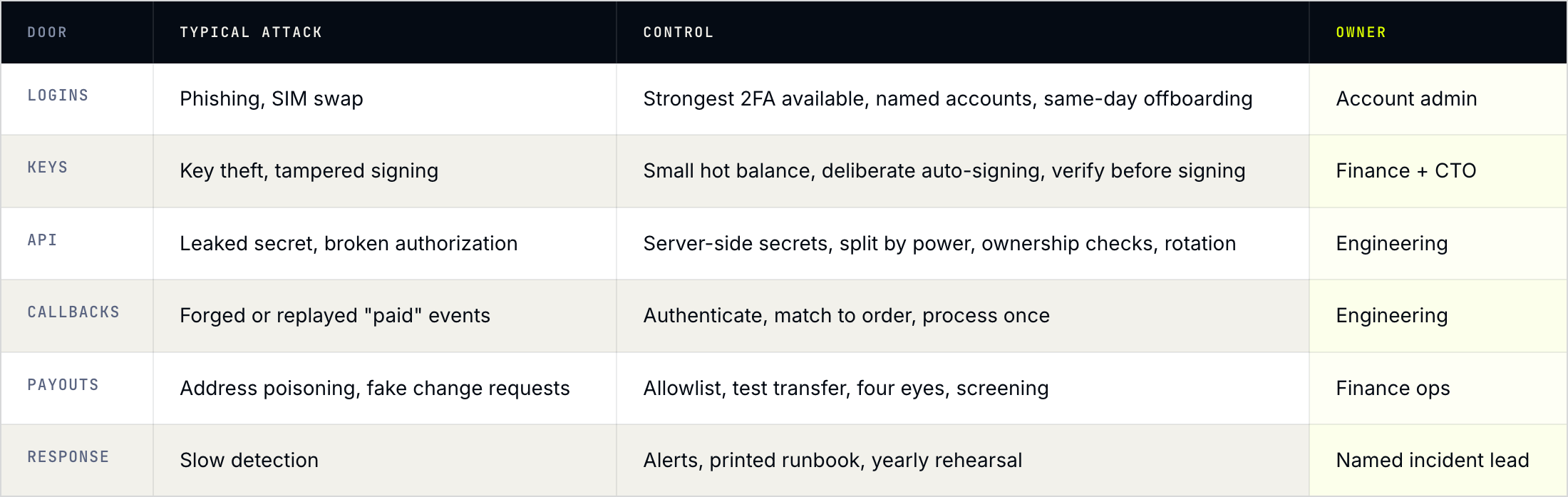
At a glance: Threat, control and owner
The same checklist, compressed into one table you can paste into a ticket. The owner column matters most: a control without an owner is a wish.
In CPAY: Which checks the platform covers
Several items on this list map directly to settings in CPAY:
- Logins and sensitive actions. Accounts can enable e-mail 2FA, authenticator-app 2FA and phone 2FA. Enabled factors are required for login, withdrawals, viewing private keys and deleting wallets or the account.
- Signing control. Auto-signing is on by default so checkouts and swaps run unattended. With it switched off, every withdrawal, multisend or swap requires the encrypted part of the private key, its password and all enabled 2FA factors. A wrong key part triggers an e-mail alert and blocks withdrawals for progressively longer periods, from 5 minutes up to 24 hours.
- Callbacks. Callbacks arrive with a Bearer token that carries an expiry, and an encrypted body. The docs include decryption code for Node.js, PHP, Python and JavaScript.
- API access split by power. Access keys from account settings are enough to create payment wallets. Withdrawals and wallet details additionally need the wallet ID and passphrase.
- Saved destinations. An address book stores verified withdrawal addresses.
- Custody model. For wallet-as-a-service, CPAY offers both custodial client wallets (export disabled for security) and non-custodial wallets with seed-phrase download.
The organisational checks (named accounts, thresholds, four-eyes approval, the runbook) stay with your team on any platform.
Score yourself: What to fix first
Count your fails per door, then fix in this order:
- Any fail in Door 1 or Door 2, this week. These are the doors that let someone move funds directly.
- Callback authentication and matching, this sprint. A forged "paid" event costs goods every time it's sent.
- Payout allowlist and four-eyes threshold, this month. Cheap to set up, expensive to skip.
- API hygiene and the runbook, this quarter, then on a yearly review cycle.
FAQ — Common follow-ups
Is a non-custodial gateway automatically more secure?
It moves the risk to you. With non-custodial wallets, a provider breach can't drain your keys, but your own key storage, signing approvals and staff access become the controls that matter. With custodial wallets, you depend on the provider's controls and contracts. Either way, this checklist applies.
Is authenticator-app 2FA enough, or do we need hardware keys?
An authenticator app is a large step up from SMS. CISA ranks phishing-resistant methods such as FIDO/WebAuthn security keys higher still. Use the strongest factor your tools support for anyone who can approve withdrawals or export keys.
Should we turn off auto-signing?
On wallets that only receive and hold treasury funds, often yes. On wallets that power checkouts, token top-ups or swaps, auto-signing is what keeps those flows working. A common pattern is automatic signing for operational wallets with small balances, and manual signing for the treasury wallet.
Can we credit an order when the customer lands on the success page?
Only as a display state. Mark the order paid when an authenticated callback for that wallet, amount and network arrives, and process each transaction ID once.
How often should we run this checklist?
Once a year in full, and again after any change to who can access funds: a new hire in finance, a new integration, a new payout partner or a new wallet.
Want 2FA on every sensitive action, signing you control and encrypted callbacks out of the box? Book a call or read the CPAY docs.
Sources: Chainalysis — 2025 Crypto Crime Mid-year Update, FBI / IC3 — Bybit PSA, CISA — Implementing Phishing-Resistant MFA, OWASP — API Security Top 10 2023, MetaMask — Address poisoning scams, CPAY Docs — Profile, CPAY Docs — Autosign, CPAY Docs — Callbacks, CPAY Docs — API integration, CPAY Docs — WaaS. This checklist is general guidance, not a security audit.